















A product demo video shows your software in action so a prospect understands what it does before they talk to sales, and so a user actually adopts it after they buy. For most B2B software, the demo that works is short, built around one real workflow, and matched to the job: winning a prospect, or driving adoption of a new release. It is rarely one long walkthrough of every feature.
If you market SaaS, own the product, or carry the commercial number, you are usually after two things: an asset you can put on the landing page and send to prospects, and a walkthrough for every release so adoption does not stall. This guide covers both: the types of product demo video, how long each should run, when to use screen recording or animation, and how to choose the right one for each job. We make these for B2B software companies, and the examples here come from that work.
Key Takeaways
- A product demo video earns its keep at two points: winning the prospect (the landing page and the link a business developer sends) and driving adoption after the sale. Keep most under two minutes.
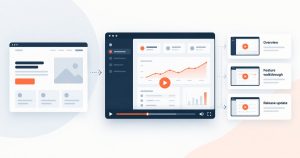
- There is no single demo. Match the type to the job: a 30 to 90 second overview for the landing page, a 1 to 3 minute feature walkthrough for evaluation, and a short walkthrough for every new release.
- Every product release needs its own walkthrough. Ship a feature with nothing to show how it works and adoption stalls, because users do not discover or understand what changed.
- Screen recording shows the real interface; animation explains the concept and the value; a hybrid of both suits most complex software.
- What converts a prospect and what drives adoption are the same craft: lead with the problem and the outcome, show one real workflow, add captions for muted viewing, and end with one clear next step.
What is a product demo video
A product demo video is a short video that shows how your software works and what a user gets from it. It is not a brand film and it is not a feature list. The job is to take a product that is often abstract, a dashboard, a workflow, a set of rules running in the background, and make it clear enough that a buyer can picture using it.
For B2B software that usually means showing one real task from start to finish: the problem, the steps in the product, the outcome. Done well, a demo answers the first question a buyer has, which is simply “what is this and will it work for me,” so the sales call starts further along.
The types of product demo video
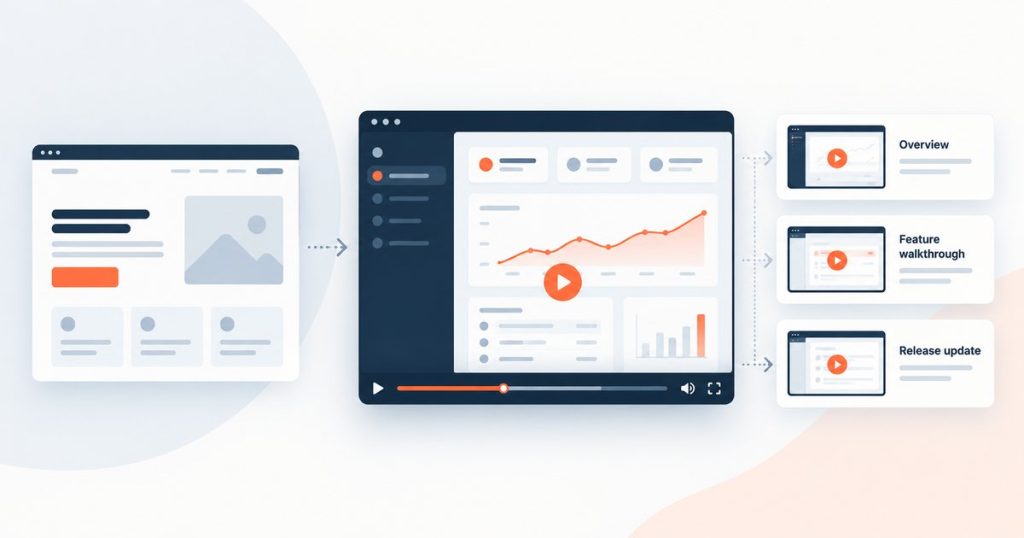
Different stages need different demos. A buyer who has never heard of you needs a fast overview; a buyer comparing two tools needs to see a specific feature work; a buyer close to signing wants the full guided version; a user who just got a new release needs to see how it works. Match the type to the job.
| Type | What it shows | Best stage | Typical length |
|---|---|---|---|
| Product overview | The problem and the core value in one pass | Awareness, landing page | 30 to 90 seconds |
| Feature walkthrough | One feature solving one real task | Evaluation and comparison | 1 to 3 minutes |
| Full guided demo | The product end to end, in chapters | Late-stage, pre-decision | Longer, chaptered so buyers skip to what they need |
| Onboarding and release walkthrough | One task, or one new feature, a user needs to understand | Onboarding and adoption | Short, one per task or release |
| Sales or personalized demo | The product framed for one account | Active deal | 1 to 2 minutes |
The mistake is making one long demo and using it everywhere. A twelve-minute full walkthrough is wasted at the top of the funnel, and a 45-second overview will not close a late-stage buyer. Produce a small set, not one catch-all.
Demos are for adoption, not just acquisition
It is easy to treat a demo as a top-of-funnel asset: the video on the landing page, the link a business developer sends a prospect. That matters, and it is usually where teams start. But for SaaS, the demo that quietly decides whether the product succeeds is the one that comes after the sale.
Every feature you release needs its own walkthrough. Ship a new capability with nothing to show how it works, and most users never find it or never understand it, so adoption stalls and the roadmap you funded does not move the numbers. A 60-second walkthrough per release, shown in the app, in the release email, and in the help centre, is what turns a shipped feature into a used one.
So the set a SaaS team needs is not one demo. It is an overview for acquisition, feature walkthroughs for evaluation, and a steady stream of short release walkthroughs for adoption. Whether you market the product, own it, or carry the number, the question is the same: what do I send a prospect, and what do I give a user so they adopt what we ship.
Screen recording, animation, or a hybrid
How you make the demo matters as much as its length. There are three ways to build one, and they answer different problems.
| Approach | Best for | Watch out for |
|---|---|---|
| Screen recording | Showing the real interface and a real workflow, when the UI is ready and stable | It dates as the UI changes, so plan to re-record |
| Animation | Explaining the concept or process before the UI makes sense, or when the interface is not ready | It shows the idea, not the literal product |
| Hybrid | Complex software: animation for the concept, screen capture for the real thing | Needs a tighter script so the two halves fit |
Screen recording is the default when the product is visual and the workflow speaks for itself. Animation earns its place when the value is abstract or the interface would confuse more than it shows. Most complex B2B software lands on a hybrid: a short animated setup that frames the problem, then the real screen doing the work.
How to choose the right demo for each stage
Before you brief a single video, decide what each one has to do. This checklist keeps the set tight and the spend honest.
- Name the stage. Awareness, evaluation, decision, or adoption. That sets the length and the type.
- Pick one workflow. Choose the single task that shows the most value, and cut everything else.
- Lead with the problem and the outcome. Open on the pain and the result, not your logo or a feature tour.
- Choose the technique. Screen recording, animation, or hybrid, based on how ready and how visual the product is.
- Write for muted viewing. Most buyers watch without sound first, so add captions and make the on-screen text carry the story.
- End with one call to action. One next step, not five.
- Plan the refresh. Decide now who updates the demo when the interface changes, and make a release walkthrough part of every ship.
Proof
Inscope is KYC compliance software that checks anti-money-laundering and counter-terrorism-financing requirements. The product is technical, and the challenge was to explain it and its functionality simply. We produced a series of software product videos: an overview of why teams should move from manual checks to automation, a sales video, and a video tutorial, in 2D animation and motion graphics. The main video runs 1 minute 7 seconds. In the client’s words, we understood the vision and met an aggressive deadline. See the full Inscope product videos.
We make this work from our studios in Madrid and Bogotá, for software companies in fintech and across SaaS. The demo is one piece of a wider video production offer: one shoot or build becomes the overview, the walkthroughs, the tutorials, and the social cut-downs.
Frequently asked questions
What is a product demo video?
How long should a product demo video be?
Should a demo be a screen recording or animated?
What makes a product demo video convert?
Do I need a video for every product release?
How much does a product demo video cost?
Need product demo videos for your software, for the landing page and for every release, with a fast turnaround? Tell us the product and where it sits across acquisition and adoption, and we will scope the set.